General Settings
Preferred Algorithm
See available algorithms in Stems Separation Quality section.
Sum of Stems = Original Mix
This option makes the sum of stems (drums, bass, other, vocals) exactly equal to the original mix.
Options:
- AI Method - Uses AI to distribute the difference across drums and other stems
- Disabled - Stems are kept as clean as possible without ensuring the sum equals the original
For Traktor Pro 4 DJing: Keep this option enabled (AI Method) to ensure the sum of stems equals the original mix.
For Serato DJing: Keep this option disabled, because Serato plays the original mix when all stems are enabled. This also gives slightly cleaner stems and faster processing time.
For Music Production: It's recommended to disable this option to get cleaner individual stems.
Due to the nature of audio separation algorithms, the output stems want to be as clean as possible, but this also means a small portion of audio information is lost. To mitigate this, NUO-STEMS calculates what audio information was lost and provides an option where the sum of individual stems equals the original audio mix.
Output Folder
Select the folder where processed files will be saved.
This setting only works for files that are allowed to use a configurable output folder.
In Serato mode, .serato-stems are always saved right next to the original file because that is where Serato expects them.
When using "Native Traktor Pro 4" mode, NUO-STEMS 4 saves natively linked STEMS ({hash}.stem.mp4) ONLY in the folder you have set for Stems in Traktor Pro 4 Preferences.
It's Traktor Pro 4 requirement to have stems in a specific folder and specific filename format. NUO-STEMS 4 follows this requirement to ensure that stems are compatible with Traktor Pro 4.
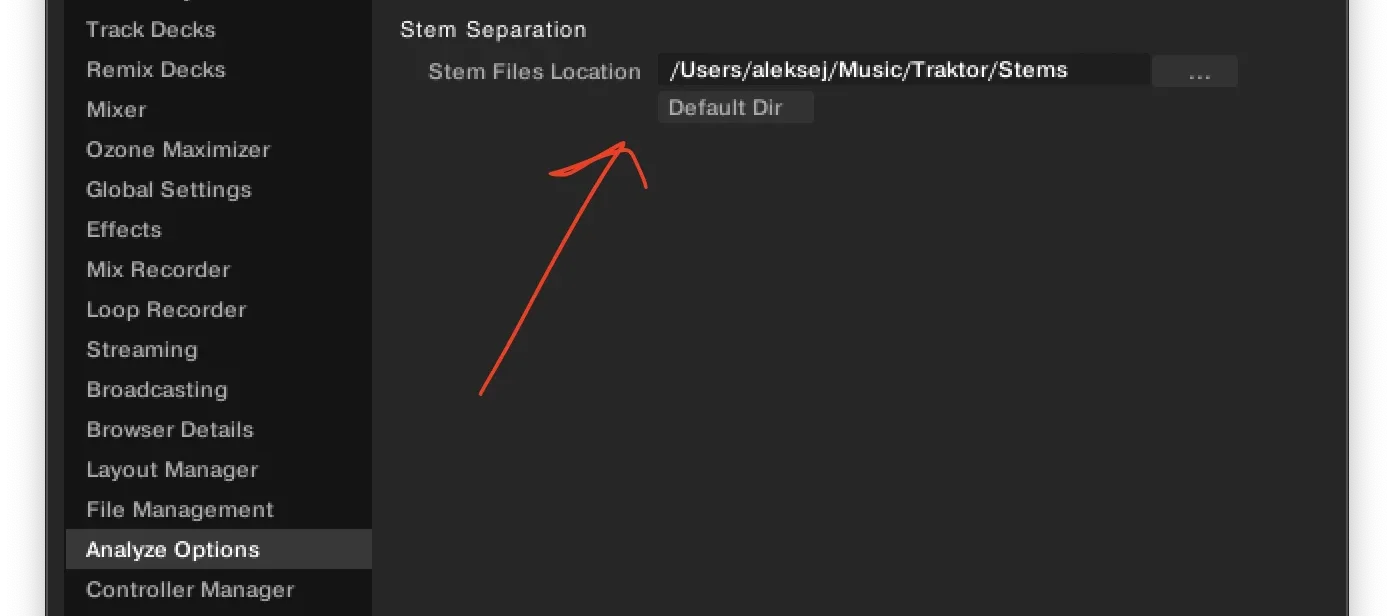
This also means that no .stem.m4a files are saved to the "output folder" you set in NUO-STEMS 4 Settings.
If you want to save legacy .stem.m4a files in whatever folder you want, you can do so by using Traktor Pro 4 Legacy / Export Mode.
Output to Original Folder
When enabled, conversion results are saved to the same location as the original track.
This setting only works in Traktor Pro 4 Legacy / Export mode or DAW mode.
In Native Traktor Pro 4 mode, the output folder is only used for:
- .wav files
- Instrumental and acapella files
In Serato mode, .serato-stems are always saved right next to the original file regardless of this setting.
In Traktor Pro 4 Legacy / Export mode, the output folder is ALSO used for:
- .stem.m4a files
When using "Native Traktor Pro 4" mode, NUO-STEMS 4 saves natively linked STEMS ({hash}.stem.mp4) ONLY in the folder you have set for Stems in Traktor Pro 4 Preferences.
It's Traktor Pro 4 requirement to have stems in a specific folder and specific filename format. NUO-STEMS 4 follows this requirement to ensure that stems are compatible with Traktor Pro 4.
This also means that no .stem.m4a files are saved to the "output folder" you set in NUO-STEMS 4 Settings.
If you want to save legacy .stem.m4a files in whatever folder you want, you can do so by using Traktor Pro 4 Legacy / Export Mode.
Keep WAV Files
When enabled, the original WAV files (drums, bass, other, vocals, instrumental) will be saved in the output folder alongside the processed stems.
WAV Filename Template
When "Keep WAV files" is enabled, you can select the template for stem filenames:
- Basic - Just keeps the stem name. Example:
vocals.wav - Prepend - Adds original filename before stem name. Example:
filename_vocals.wav - Append - Adds original filename after stem name. Example:
vocals_filename.wav
Append Metadata to WAV Filenames
When enabled, conversion metadata (algorithm, sum of stems = original, app version) will be appended to WAV filenames.
Example:
track1_vocals___algorithm-mel_vocals_bs_others___nullifySum-ai_distribute_on_drums_and_other___nuoStemsVersion-4.0.0-alpha.37.wav
Save Instrumental & Acapella
When enabled, instrumental (all stems except vocals) and acapella (vocals only) stems will be saved in the output folder alongside the processed stems.
This is commonly used in non-Traktor DJ software.
Metadata is migrated and "(acapella/instrumental)" is appended to the end of the title.
You can select the encoding format for instrumental and acapella:
- MP3 @ 320 kbps - Compressed format with high quality
- WAV - Uncompressed format