FAQ
NUO-STEMS 4 is only compatible with Traktor Pro 4.
If you need to use .stem.m4a in Traktor Pro 3, you can continue to use NUO-STEMS 3.
See more information in Migrating from NUO-STEMS 3 section.
How to get the 4.0.0-alpha installer?
Please write me in private messages or to [email protected], and I will send you the installer 🚀
How does NUO-STEMS 4 work with TP4 native stems?
See Native Traktor Pro 4 Mode for more information.
How does NUO-STEMS 4 work with Serato?
See Serato mode for more information.
What are the different ways to create stems in NUO-STEMS 4?
See Modes Overview for more information.
Do I need to purchase a new license for NUO-STEMS 4?
Yes, NUO-STEMS 4 is a separate license. You can't use your NUO-STEMS 3 license for NUO-STEMS 4.
All users who purchased NUO-STEMS 3 after 1 November 2025 will get a free upgrade to NUO-STEMS 4.
Patreon subscribers will get a free upgrade to NUO-STEMS 4. Just install NUO-STEMS 4 and your license will be activated automatically.
Why NUO-STEMS 4 generates weird {hash}.stem.mp4 files?
I converted my track to stems using "Traktor Pro 4" tab in NUO-STEMS 4 and got this file:
...Traktor/Stems/069/F0ILIYDQZQLICDIKTDVCBPX0XLPC.stem.mp4
You may have questions like:
- Why is it named like this?
- Why is it not saved to the "output folder" I set in NUO-STEMS 4 Settings?
- How to fix it?
- I want to have custom folder for stems, not in Traktor/Stems/069/ folder.
When using "Native Traktor Pro 4" mode, NUO-STEMS 4 saves natively linked STEMS ({hash}.stem.mp4) ONLY in the folder you have set for Stems in Traktor Pro 4 Preferences.
It's Traktor Pro 4 requirement to have stems in a specific folder and specific filename format. NUO-STEMS 4 follows this requirement to ensure that stems are compatible with Traktor Pro 4.
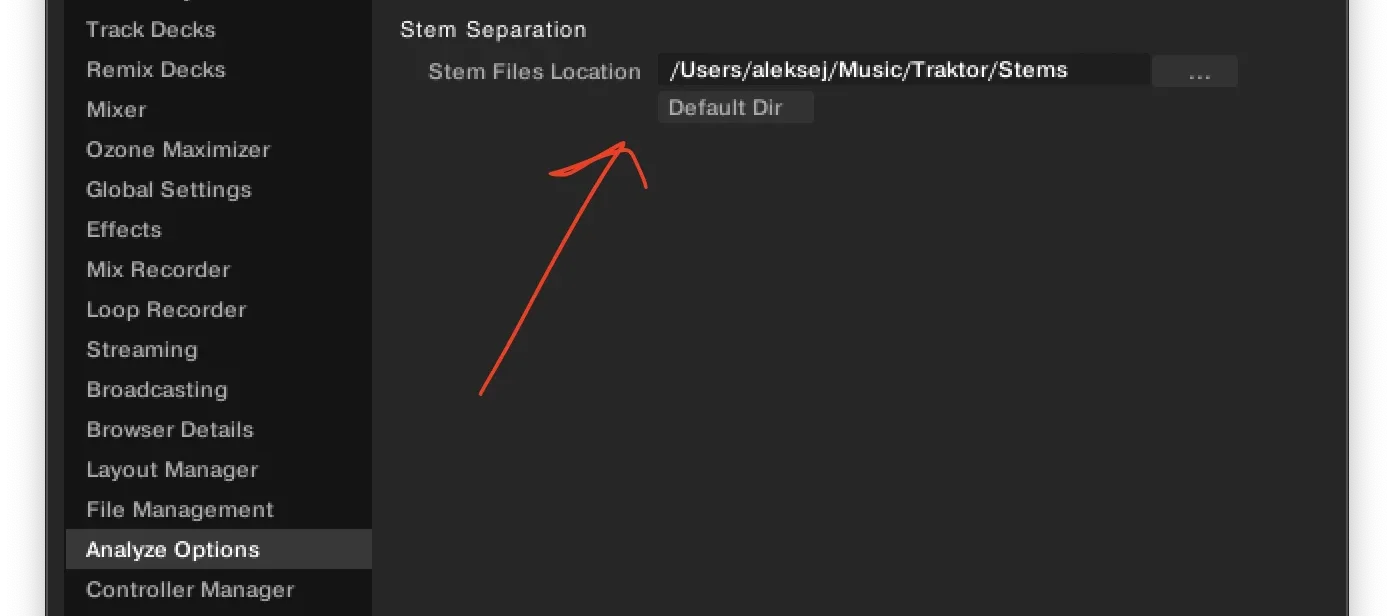
This also means that no .stem.m4a files are saved to the "output folder" you set in NUO-STEMS 4 Settings.
If you want to save legacy .stem.m4a files in whatever folder you want, you can do so by using Traktor Pro 4 Legacy / Export Mode.
I generate stems in Native Traktor Pro 4 mode, but they don't appear as linked in my collection?
Usually, the only reason this happens is if you don't have correct collection.nml selected.
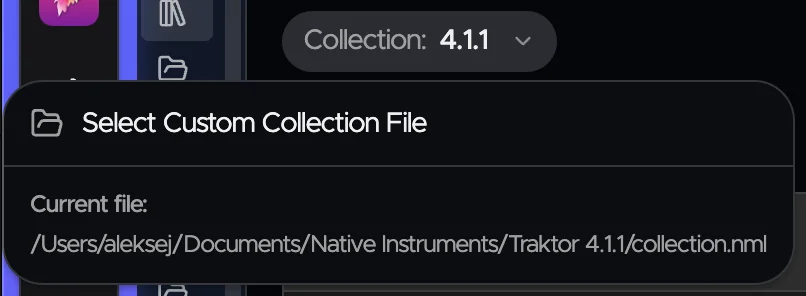
Make sure to select the correct collection.nml file.
For existing TP4 stems, will NUO-STEMS 4 replace these in-place?
Yes, just right-click on track/s in "Traktor Pro 4" tab of NUO-STEMS 4 and click "Add to Queue".
What if I have duplicate tracks and use "Native Traktor Pro 4" mode?
This applies only to Traktor Pro 4 native mode.
Traktor searches for linked stems files by AUDIO_ID of the original track. This means that if you have duplicate tracks (same original) in your collection, they will share the same linked stems file ({hash}.stem.mp4).
Important: If you process stems for one duplicate track using Traktor's built-in stem separation, it will overwrite the NUO-STEMS processing for all other duplicate tracks of the same original.
To avoid this issue:
- Remove duplicate tracks from your collection. (recommended)
- Use NUO-STEMS 4 exclusively for stem processing when you have duplicate tracks
This is a Traktor limitation, not a NUO-STEMS 4 limitation.
Here is what an example of this issue looks like:
- Generate Stems for Track A in NUO-STEMS 4 in "Native Traktor Pro 4" mode
- Go to Traktor and add another duplicate of the track
- Now you have Track A (already processed by NUO-STEMS 4) and Track B (duplicate of Track A, not processed, doesn't have linked stems)
- Click "Generate Stems" for Track B in Traktor Pro 4
- The NUO-STEMS 4 processing of Track A gets overwritten (both tracks now use Traktor's stem separation)
New native mode will also mean the playlists are now automatically synced from the original to the stem?
Yes. Playlists consist of original tracks. And original tracks have natively linked stems.
How to stay tuned for announcements and updates?
- Join our Discord server: https://discord.gg/dfpk9FbvJE
- And Facebook group: https://www.facebook.com/groups/nuostems/
Which platforms are supported?
Windows, MacOS Apple Silicon, MacOS Intel.
GPU acceleration requires:
- NVIDIA GPU with 4GB or more VRAM or any GPU that supports DirectX 12 (FL 12.0 or higher) on Windows
- Apple Silicon on MacOS.
I want to generate stems on my Gaming PC and then use them on my DJ Laptop. Can I do this?
Yes, you can use Traktor Pro 4 Legacy / Export Mode to generate .stem.m4a files on your Gaming PC.
Then you can use Utilities to migrate .stem.m4a files to linked stems on your DJ Laptop Traktor collection.
Using Utilities does not require a paid license.
Traktor Pro 3 compatibility
.stem.m4a files created in NUO-STEMS 4 are not compatible with Traktor Pro 3.
When trying to load .stem.m4a files created in NUO-STEMS 4 in Traktor Pro 3, you will see an error:
Can not read stem metadata for file: FILE.stem.m4a. Detail: version: 2 is not supported.
This is a deliberate decision for NUO-STEMS 4 to not support Traktor Pro 3 - I want you to support Traktor team by upgrading to Traktor Pro 4. I strongly believe that 50$ (as of Black Friday deals) is a great value for what you're getting - it's an investment into future of Traktor.
Traktor Pro 3 was released October 18, 2018. Which is more than 7 years ago.
If you need to use .stem.m4a in Traktor Pro 3, you can continue to use NUO-STEMS 3 with Traktor Pro 3.
You can read more about this in the Traktor Pro 4 Legacy / Export Mode section.
Can I convert my existing .stem.m4a files (created in NUO-STEMS 3) to NUO-STEMS 4 native stems?
No. Because NUO-STEMS 4 now has a different decoding mechanism. This results in a different track length than NUO-STEMS 3 (which relied on additional silence added at the beginning of the track and offset from the original track)
NUO-STEMS 4 now has exactly the same track length as the original track.
So what does this mean for our NUO-STEMS 3 stems? Does NS4 automatically replace them or do we have to reanalyse the library and manually discard the old ones?
NUO-STEMS 4 doesn't work with NUO-STEMS 3 stems (as described in the previous section). You can either:
- generate new linked native stems in NUO-STEMS 4 for your originals and therefore get rid of NUO-STEMS 3 stems.
- or generate new NUO-STEMS 4 .stem.m4a files and replace existing .stem.m4a files in-place and use them as standalone files.
Traktor Pro 3 compatibility
.stem.m4a files created in NUO-STEMS 4 are not compatible with Traktor Pro 3.
When trying to load .stem.m4a files created in NUO-STEMS 4 in Traktor Pro 3, you will see an error:
Can not read stem metadata for file: FILE.stem.m4a. Detail: version: 2 is not supported.
This is a deliberate decision for NUO-STEMS 4 to not support Traktor Pro 3 - I want you to support Traktor team by upgrading to Traktor Pro 4. I strongly believe that 50$ (as of Black Friday deals) is a great value for what you're getting - it's an investment into future of Traktor.
Traktor Pro 3 was released October 18, 2018. Which is more than 7 years ago.
If you need to use .stem.m4a in Traktor Pro 3, you can continue to use NUO-STEMS 3 with Traktor Pro 3.
You can read more about this in the Traktor Pro 4 Legacy / Export Mode section.
If I'm using 320 AAC CBR stems, is it still better to process using FLAC files vs high quality MP3? I keep most of my music in mp3 (but I convert them from FLAC myself using high quality conversion)
Depends on your "lossless religion" 😅. I'd say mp3 is fine. I just keep my library original all ALAC, as it's easier to download them this way. And in case future algorithms will need lossless for some reason - I'm covered. But of course, I have random mp3 and m4a tracks from SoundCloud that are completely lossy.
Another argument for FLAC/ALAC originals is how mp3 gets decoded into WAV/FLAC/ALAC. If you've ever heard about hotcue offset issues when converting hotcues between Traktor/RB/Serato/etc - this is what it's related to - mp3 decoding which impacts absolute track duration.
If you're using "natively linked" 320 CBR NUO-STEMS 4 stems though, it relies on what's inside your collection (in your case - .mp3 originals). So if you're not using FLAC/ALAC in your collection - you won't be able to convert from FLAC/ALAC to "natively linked" STEMS as well (due to the mp3 decoding issues described above).
My Anti-Virus complaints about NUO-STEMS 4 on Windows
If you're using Windows, your Anti-Virus might complain about NUO-STEMS 4.
This is because NUO-STEMS is not "signed" on Windows because it's incredibly hard to obtain "EV Certificate". You need to have a company, various checks etc. At some point I tried to do that, but failed due to being situated in Ukraine. There are no such issues on MacOS - everything is properly signed there.
Can NUO-STEMS replace Stem Creator by Native Instruments?
First of all, here is the fix to Stem Creator to make it work with latest versions of MacOS: link
Secondly, here is the reason why "not":
Mostly because of "compressor" & "limiter" that are present in Stem Creator. It looks like some VST magic that NI built into Stem Creator to provide real-time feedback. I'm not familiar with this technology, so your best luck remains with Stem Creator 🙂
NUO-STEMS is "stuck" at "Checking License" or "License Check Failed"
First, check that you can open https://nuo-stems.com in your browser. If you can't - there might be a problem with your internet connection or DNS settings.
There might be few potential causes:
- Your computer is not connected to the internet. NUO-STEMS requires internet connection on the startup to check the license.
- Your provider/system/WiFi-router blocks
https://nuo-stems.comfrom being reachable.- Restart computer
- Restart WiFi router
- Launch NUO-STEMS
- Windows PowerShell is for some reason "broken" on your computer
- Follow this guide to fix it: link
If none of the above helps - try settings your DNS to Cloudflare DNS: 1.1.1.1 and 1.0.0.1. Instructions: link
I bought new computer, how do I activate/transfer my license to it?
If you want to transfer license to new computer - you need to send me ONLY VIA EMAIL:
- Use email that you used for purchase (I will not accept license transfer via any other email)
- Upon purchase, you always receive an email from [email protected], so try searching for it in your email inbox.
- New computer uuid:
- Go to NUO-STEMS 4 "Settings" -> "Activation & License" -> Copy computer UUID
Typical response time is 24-72 hours during business days.
NUO-STEMS crashes at launch
Try deleting these folders and then start NUO-STEMS again:
- On Windows:
C:\Users\YOUR_USERNAME\AppData\Local\Programs\NUO-STEMS-4\- (or
NUO-STEMS-3if you're using NUO-STEMS 3)
- (or
- And also remove:
C:\Users\YOUR_USERNAME\AppData\Roaming\NUO-STEMS-4\- (or
NUO-STEMS-3if you're using NUO-STEMS 3)
- (or
- On Mac OS:
/Users/YOUR_USERNAME/Library/Application Support/nuo-stems-4/- (or
nuo-stems-3if you're using NUO-STEMS 3)
- (or
If it doesn't help:
- Launch NUO-STEMS and let it "crash"
- Send me main.log file from:
- Windows logs location:
C:\Users\YOUR_USERNAME\AppData\Roaming\nuo-stems-4\logs\main.log- (or
nuo-stems-3if you're using NUO-STEMS 3)
- (or
- Mac OS logs location:
/Users/YOUR_USERNAME/Library/Logs/nuo-stems-4/main.log- (or
nuo-stems-3if you're using NUO-STEMS 3)
- (or
- Windows logs location:
Where can I read about what's coming & talk to other users?
- Join our Discord server: https://discord.gg/dfpk9FbvJE
- Or the Facebook Group
- Some things are also posted in the NUO-STEMS blog
I don't have Facebook Page, how can I get support?
You can contact me on [email protected]
[error] Unhandled Exception UnhandledRejection Error: Python exited with code 255
Solution: change Preferred Algorithm in “Settings” from MPS to CPU.
Can I use my license on 2 computers?
One license is only for one computer.
If you want to transfer your license to another computer – see License Transfer page 🙂
If you want to use Gaming PC to generate stems and then use them on your DJ Laptop - you only need 1 license:
- Gaming PC - needs license
- DJ Laptop - doesn't need license
See using another computer to generate stems for more information.
My collection.nml got corrupted, how do I fix it?
NUO-STEMS 4 (and NUO-STEMS 3) automatically creates a backup of your collection.nml on every launch. If you have a problem with your collection.nml - try to revert it to the backup.
Backups are stored in the "Collection Backups NUO-STEMS 4" or "Collection Backups NUO-STEMS 3" folder in the same folder as your collection.nml. Example for Traktor 4.1.1:
- MacOS:
/Users/YOUR_USERNAME/Documents/Native Instruments/Traktor 4.1.1/Collection Backups NUO-STEMS 4or3 - Windows:
C:\Users\YOUR_USERNAME\Documents\Native Instruments\Traktor 4.1.1\Collection Backups NUO-STEMS 4or3
I don't have originals in my collection, I only use .stem.m4a files. Can I still use NUO-STEMS 4?
See I have only .stem.m4a and no originals for more information.
Dealing with Errors in NUO-STEMS 4
Errors happen. If your track fails to process, you can see the exact error message by hovering over the error icon next to the track in the queue.
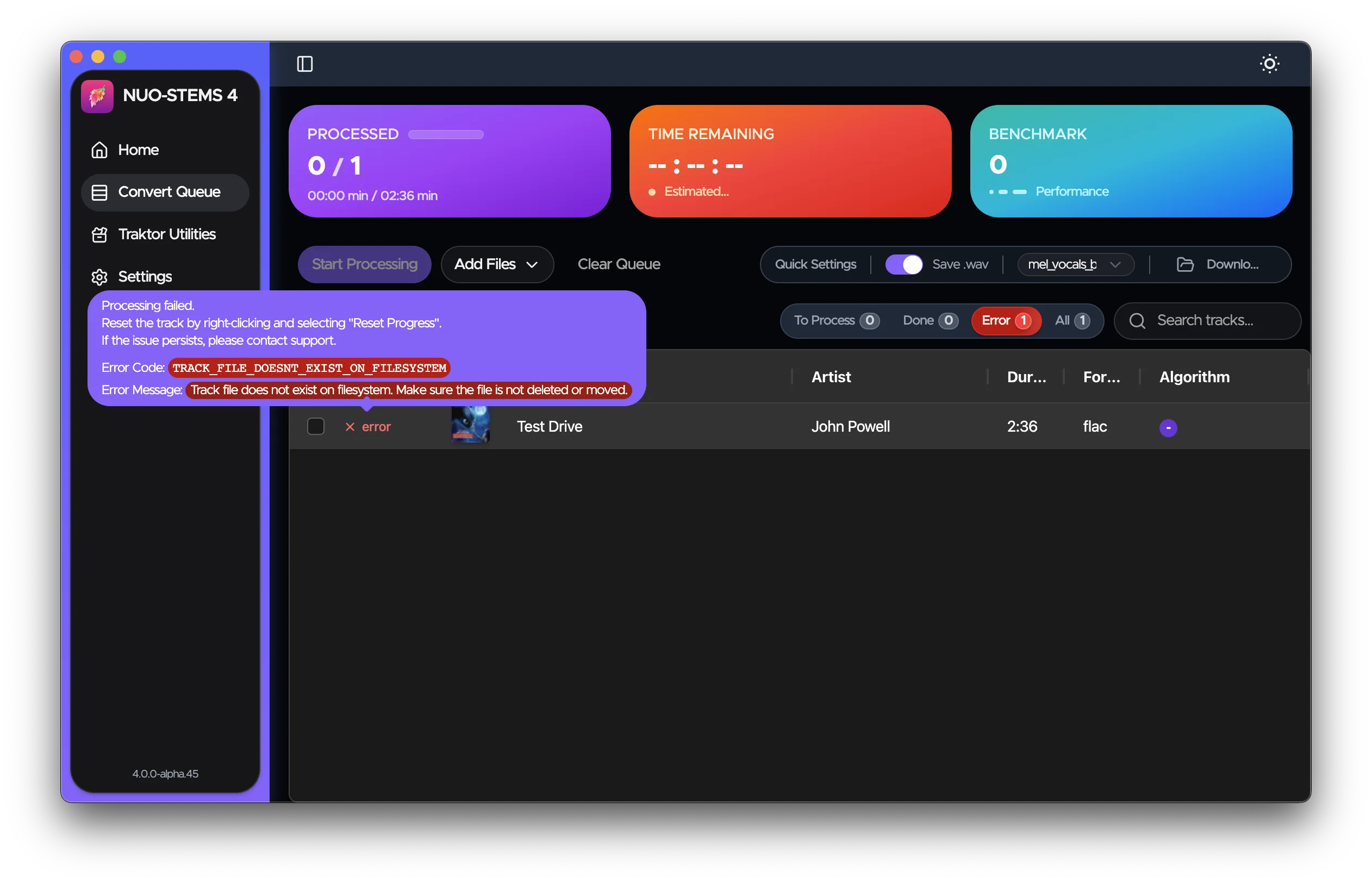
It's usually enough to understand the error and fix it on your own.
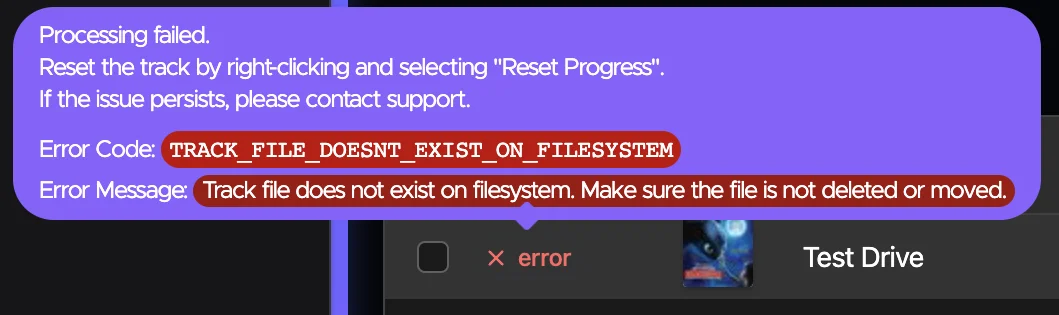
Sometimes, error may simply go away if you just re-add the track to the queue.
Getting Help
If you continue to experience issues or you're not sure how to fix the error:
- Join our Discord server: https://discord.gg/dfpk9FbvJE
- Contact me: [email protected]
When reporting errors, please include:
- The error message you're seeing
- Steps to reproduce the issue
- The
main.logfile from the logs directory - open NUO-STEMS 4 Settings -> Advanced -> Open Logs Folder.- Don't share the log publicly - only to [email protected]